
Live driver tracking: see every tiffin driver on one map
See every driver on one map while they deliver: how many stops they have done, their next stop and about when they should get there, and who is running late. Only your kitchen sees the map. Customers never see where the driver is.
A customer calls at 12:15 to ask where lunch is. You open the Live map, see that the driver is two stops away, and tell them it will be there in about ten minutes. Nobody has to phone the driver while they are on the road.
Live driver tracking shows every driver on one map while they deliver, with how far through the run they are and whether they are on time. It works with delivery routes and the free driver app, so there is nothing extra to set up. When a driver taps Start route, they appear on your map.
Every driver on one map
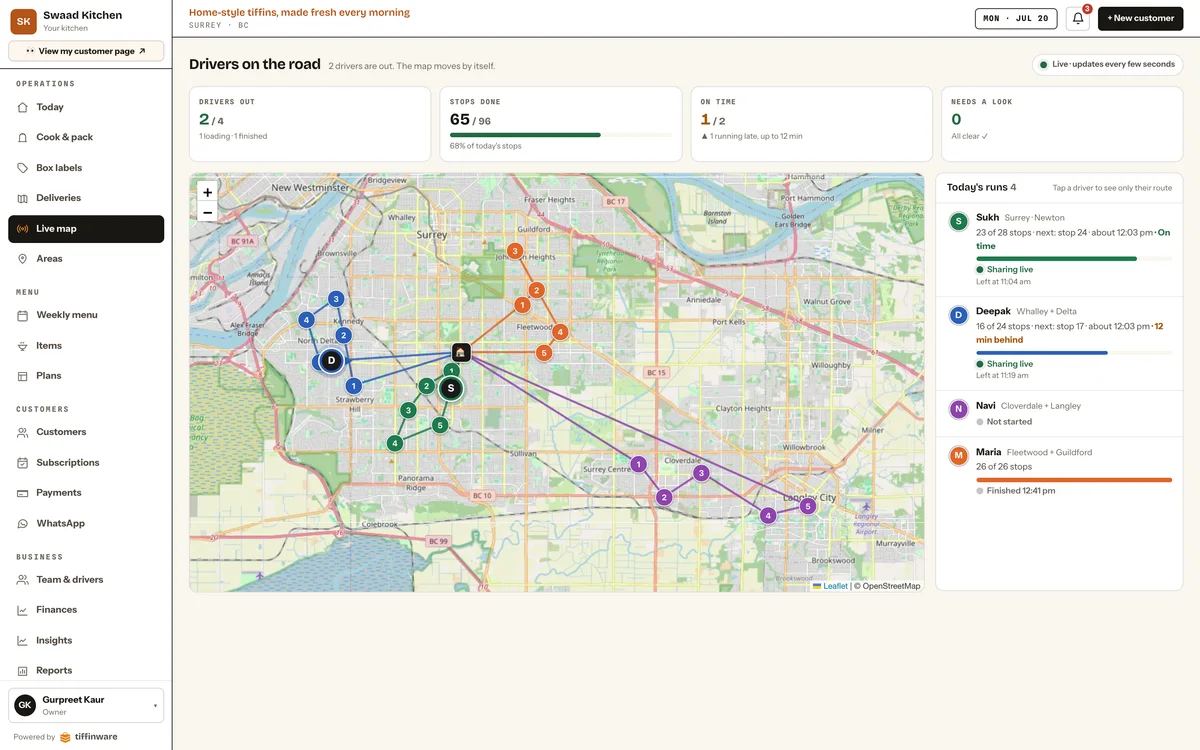
The map shows each run in its own colour, with the stops numbered in driving order and the road the driver has driven so far. Drivers' positions update every 15 seconds while you have the map open.
Beside the map is a row for each of today's runs:
- Stops done, like 20 of 28.
- The next stop and about when the driver should get there.
- On time, or how many minutes behind.
- Sharing live, or the reason they are not: the app is closed, the phone has no signal, or the driver chose not to share.
- When they left, or when they finished.
Tap a driver to see only their route on the map, with the others faded.
The delivery day at a glance
Four numbers sit above the map: drivers out, stops done out of the day's total, on time (with the longest delay if anyone is late), and needs a look, which counts failed deliveries, phones that stopped sharing and boxes that are not on any run.
Who can see a driver's location
The Live map is for your kitchen. Customers never see where the driver is. Their page shows that their tiffin is on the way and who is bringing it, and they get a photo of the box at their door once it is delivered.
Drivers choose whether to share their location. When they tap Start route, the Tiffinware Driver app asks them. A driver who says no can still use every part of the app, and their deliveries still update on your screen. Sharing stops when they tap Finish run, and their live position is erased as soon as the run ends. The road a run drove is kept for 14 days, then deleted. The privacy policy has the details.
You can turn live tracking off for the whole kitchen in Settings. Drivers then share nothing, and the map shows the day's stops without them.
When a phone loses signal
The driver's phone checks in every 15 seconds while someone in the kitchen has the map open, and every 45 seconds when nobody is watching, even while it is parked at a door. If a minute passes without a check-in, the driver's row says the app may be closed or out of signal, so you are not left looking at an old position. A stop marked delivered in a basement or parkade is saved on the phone and sent when the signal comes back.
Delivery history and reports
The Live map uses the same runs as Deliveries, and those come from the same orders as the cook sheet and the box labels. When the day is done, delivery history keeps every stop with its photo, and the delivery reports show how many were delivered, by area and by driver.
Open the Live map demo to watch sample drivers move. No sign-up needed.
What you get
- Every driver on one map while they deliver, updated every 15 seconds
- Each run's stops in driving order, in the run's own colour
- The road each driver has driven so far
- Each driver's stops done, next stop and about when they should get there
- Running late or on time, with how many minutes behind
- The day in four numbers: drivers out, stops done, on time, and what needs a look
- A note when a driver's phone stops sharing, and why
- Tap a driver to see only their route
- Location shared only from Start route to Finish run, and only if the driver says yes
- Switch it off for the whole kitchen in Settings
- Customers see that their tiffin is on the way, never where the driver is
- A driver's live position erased when the run ends
Drivers use the free Tiffinware Driver app, on iPhone and Android:


Questions
Can I track my tiffin delivery drivers live?
Yes. While a driver is on a run, Tiffinware shows them on your Live map, with how many stops they have done, their next stop, about when they should get there, and whether they are running late. The map updates every 15 seconds.
Can customers see where the driver is?
No. The map is for your kitchen only. A customer's page says their tiffin is on the way and who is bringing it, but never where the driver is. They get a photo at the door when it is delivered.
Does the driver have to share their location?
No. When a driver taps Start route, the app asks whether to share their location. They can say no and still use every part of the app; their deliveries still update on your screen. You can also switch live tracking off for the whole kitchen in Settings.
When does tracking stop?
When the driver taps Finish run. Their location is shared only between Start route and Finish run, and their live position is erased as soon as the run ends.
What if the driver loses signal?
After a minute without a check-in from the phone, the driver's row on the map says the app may be closed or out of signal. Deliveries marked without signal are saved on the phone and sent when the signal comes back.
Does live tracking cost extra?
No. It is part of the Tiffinware plan, for any number of drivers, and the Tiffinware Driver app is free on iPhone and Android.
More features
Customer CRM
Tiffin and meal prep CRM: every customer, plan and payment on one page
Meal plan subscriptions
Recurring meal plans with pause and skip that update the cook count
Weekly menu planner
Plan the week's menu once, and everything else follows
Daily cook sheet
Prep sheet software: know how many meals to cook before you start
Box labels
Meal prep label maker: a label on every box, from the day's orders
Delivery areas, routes & drivers
Meal prep route planning: your driver gets stops in the right order
Payments & collections
Tiffin billing software that shows who has paid
Customer ordering page
Your own online ordering website for tiffin and meal prep
Reports & analytics
See if your kitchen is making money